![FMN_logo_2024.png]](https://support.forgetmenot.chat/hs-fs/hubfs/FMN_logo_2024.png?height=40&name=FMN_logo_2024.png)
The burst mode is an enrolment type option that can be applied to any series at the time of enrolling learners. It is designed to give learners the opportunity to attempt all questions in the series, in a single session, thereby giving them the ability to master a series in a short period of time.
The benefit of Burst Mode is that a learner who already has topic knowledge, they can show this when answering questions.
Burst mode overrides the default delivery parameters that the series has, and applies the following values:
- Mastery Goal: The mastery goal will be set to 1 regardless of the current value
- Question per day (QPD): current values are ignored and all questions will be offered
Burst mode is a great way for learners to demonstrate their knowledge in a series and quickly obtain mastery. If they know and understand the content, then by answering a question correctly, it is marked as mastered after just 1 attempt, and they are given the next question straight away. If they answer them all correctly, they will master the series.
If they get any incorrect. That's ok too, as they'll get to attempt those questions again on the next day. They will continue to get any incorrectly answered questions each day, until all questions have been mastered.
The following table shows three different scenarios of how learners might progress when using burst mode.
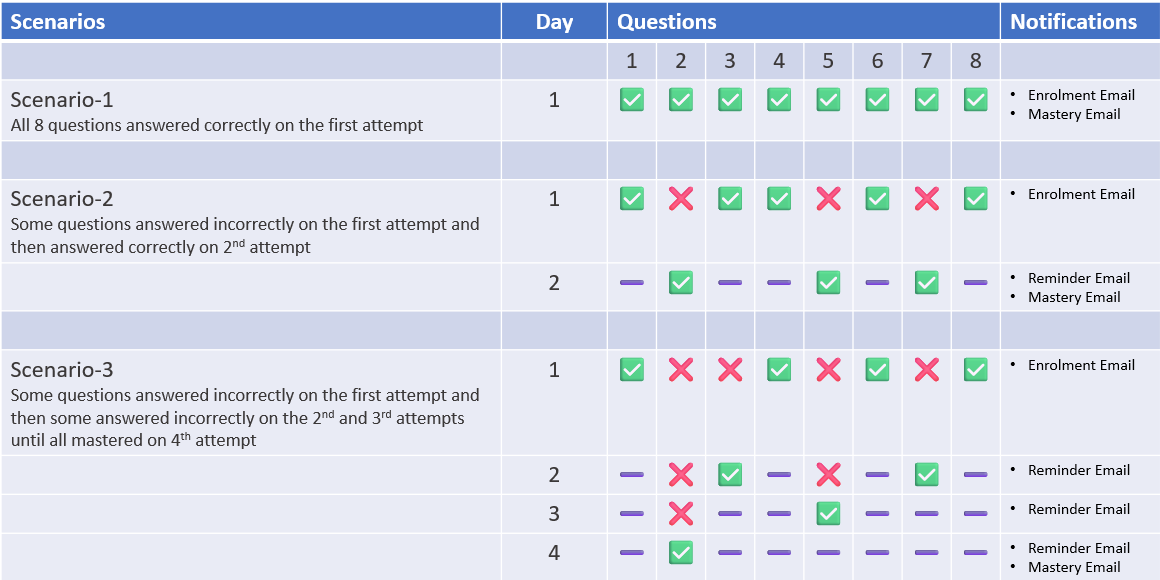
✅ In Burst Mode, learners will always get an enrolment notification email, a mastery email, and only get reminder emails if they don't answer a question correctly
✅If you want a learner to take time to embed the knowledge then you can choose to use Standard Mode instead of Burst Mode