![FMN_logo_2024.png]](https://support.forgetmenot.chat/hs-fs/hubfs/FMN_logo_2024.png?height=40&name=FMN_logo_2024.png)
The Groups List is useful to see all Groups within your organisation. The list also shows the membership count for each group, which Admin users are the owner of the group, and also if the group is a member of another group (nested groups).
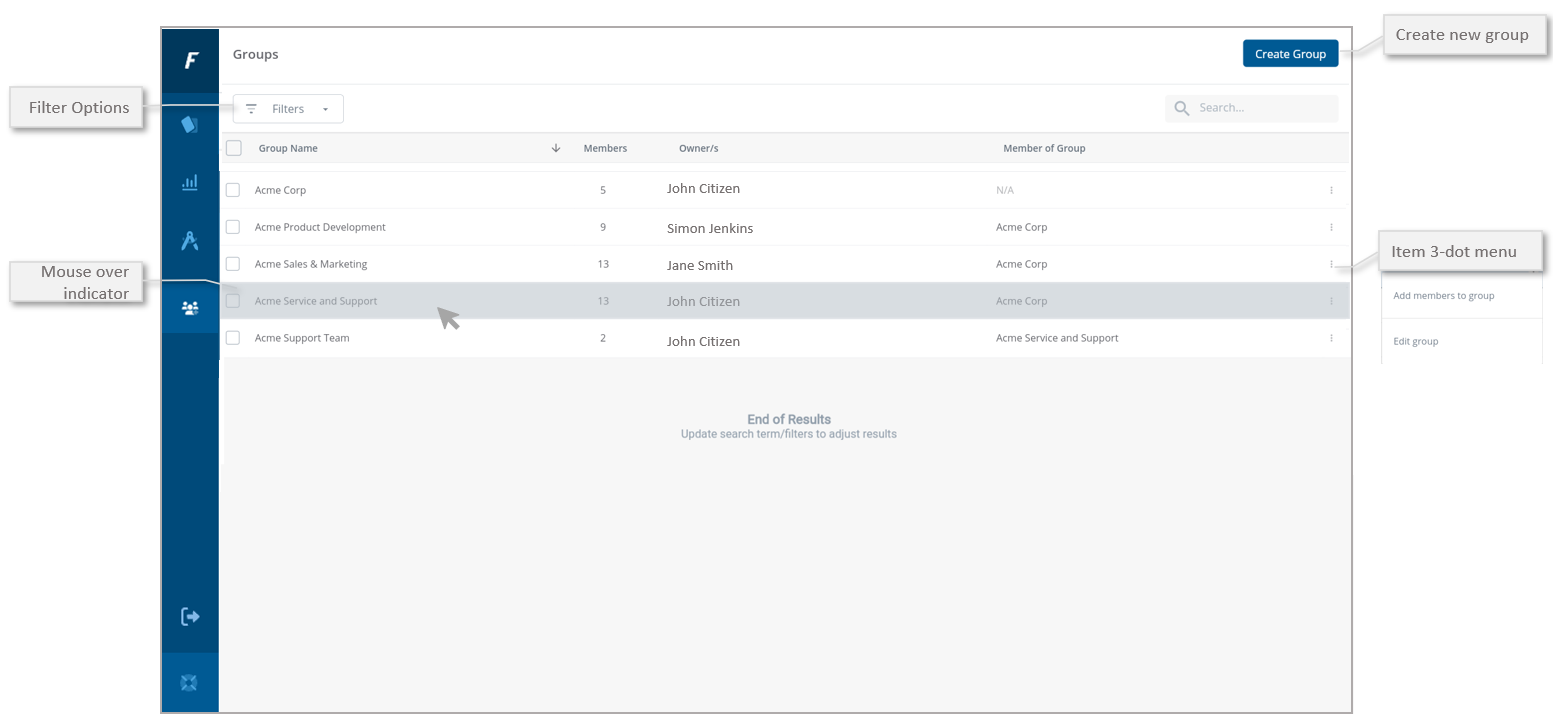
Filter Options
Use the filter to only show items that match the options
- Is part of other groups (this will show groups that are members of another group)
- Has other groups within (this group contains other sub-groups)
Create New Group
Use to create a new group for the organisation. Groups should have a unique name in the list.
Search and Sort
Use the Search function to filter the list to match the entered search term. The list can be sorted by A-Z⬆️ or Z-A⬇️ by selecting the column heading text to change the arrow direction ⬆️ vs ⬇️
Mouse over indicator
Use the mouse to show which item is ready to be clicked. When a group is clicked, the Group Membership Details view is shown.
3-dot item menu
Use the item 3-dot menu to access additional functions such as:
- Add members to group
- Edit Group