![FMN_logo_2024.png]](https://support.forgetmenot.chat/hs-fs/hubfs/FMN_logo_2024.png?height=40&name=FMN_logo_2024.png)
It is critical to understand how the enrolment status aligns to the learner onboarding status across Learner and Enrolment milestones when analysing Insight Reports. Being able to understand these relationships, not only aides in your own understanding but also helps when guiding others.
Main elements of the timeline
- Enrolment Milestones - Key milestones showing; processing of Series enrolments, when learners start, when they actually attempt their first question, when the enrolment ends and when extended access ends
- Enrolment Status - Showing high level status as shown in the console and the more detailed status as shown in the Insights Reports. Some of these are also used to show the status when the enrolment has ended
- Learner Milestones - Key milestones showing; learner invite received and opened, app installation and app sign in, opening a series, attempting the 1st question and finally completing all questions or not being able to complete them
- Learner Onboarding Status - Showing each of onboarding stages which can vary depending on enrolment method and if the learner is new or existing
Enrolment Status & Learner Onboarding Timeline
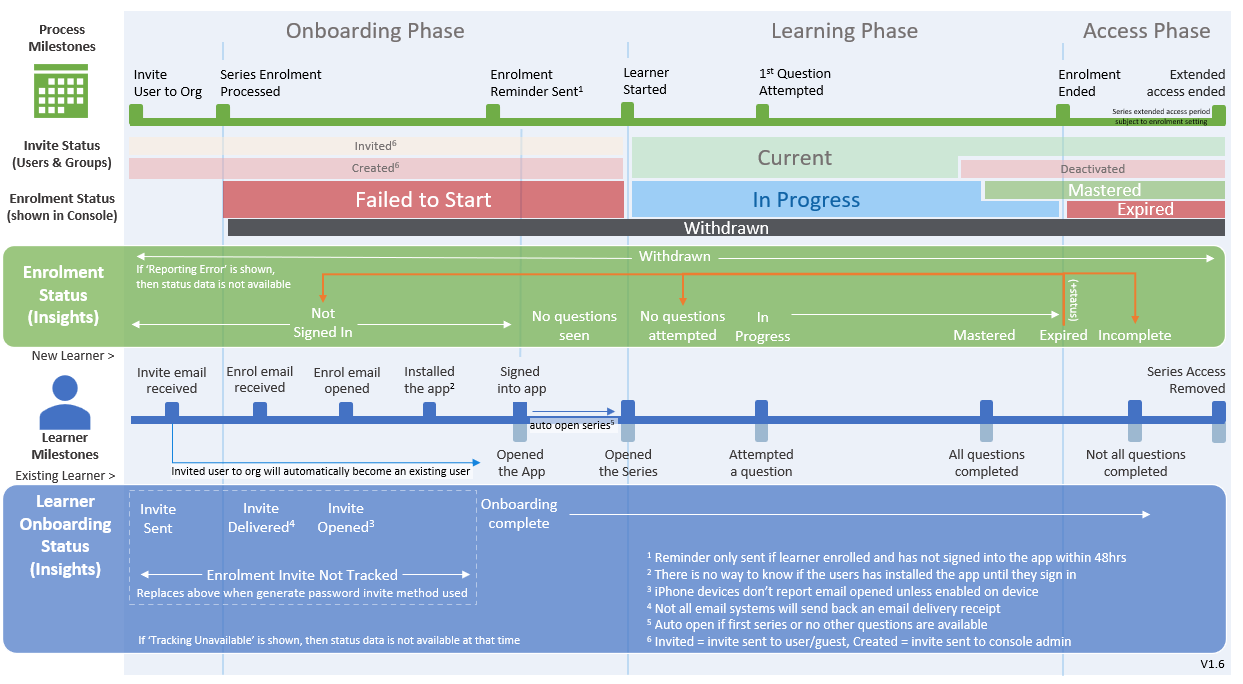
⚠️ It's important to be familiar with all of the highlighted conditions that may affect the status values in the Insight Reports such as email delivery and open notifications