![FMN_logo_2024.png]](https://support.forgetmenot.chat/hs-fs/hubfs/FMN_logo_2024.png?height=40&name=FMN_logo_2024.png)
Sometimes question sets can be created in the studio or shared with your organisation where at a later date you decide you don't need anymore. So these question set drafts do not appear in the list when creating a new series, they can be archived which also removes them from the default view in the Question Studio.
⚠️ Archiving of question set drafts is currently not a function of the console. Please contact FMN support if you would like to have a draft set archived
Question Sets that have been archived will show a status of Archived and can only be viewed when the Status filter is set to Archived.
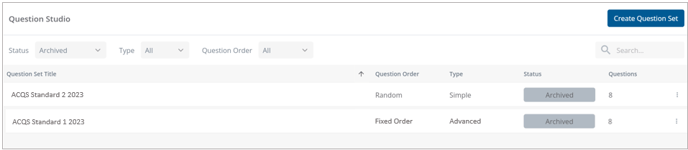
✅ To reactivate an archived question set, simply find it in the Archived list and then select Edit and save the changes. This will update the set to Incomplete draft which will not appear in the default question studio list.