![FMN_logo_2024.png]](https://support.forgetmenot.chat/hs-fs/hubfs/FMN_logo_2024.png?height=40&name=FMN_logo_2024.png)
As of Management Console 1.5.X, 3rd-party password manager integration is now supported. Apply saved credentials from a 3rd-party password manager to make logging in to the console easier.
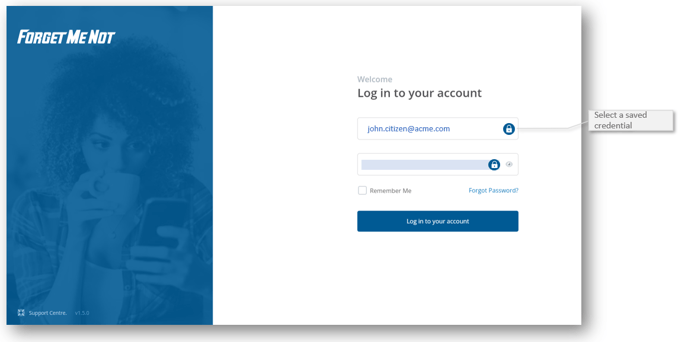
Steps to login with a password manager
- Go to the console login screen console.forgetmenot.chat.
- Click into the Email field to display your 3rd-party password manager icon.
- Follow your 3rd-party password manager instructions to select a stored set of credentials.
- The email address will be displayed in the email field or a blue bar may appear.
- Click into the password field to display a blue bar.
Note: This should also ensure the email address is displayed in the email field. - Then select Log in to your account to continue.
⚠️ If your password manager icon does not appear in the email or password fields, it may not be compatible with the browser. Contact your password manager provider for support with this.