![FMN_logo_2024.png]](https://support.forgetmenot.chat/hs-fs/hubfs/FMN_logo_2024.png?height=40&name=FMN_logo_2024.png)
The following steps will configure Audacity audio recorder program to record audio directly from the computer sound and save the files as MP3 format for use as audio clips.
Prerequisites
- Download and install the Audacity program
- Windows PC with speakers or connected headset
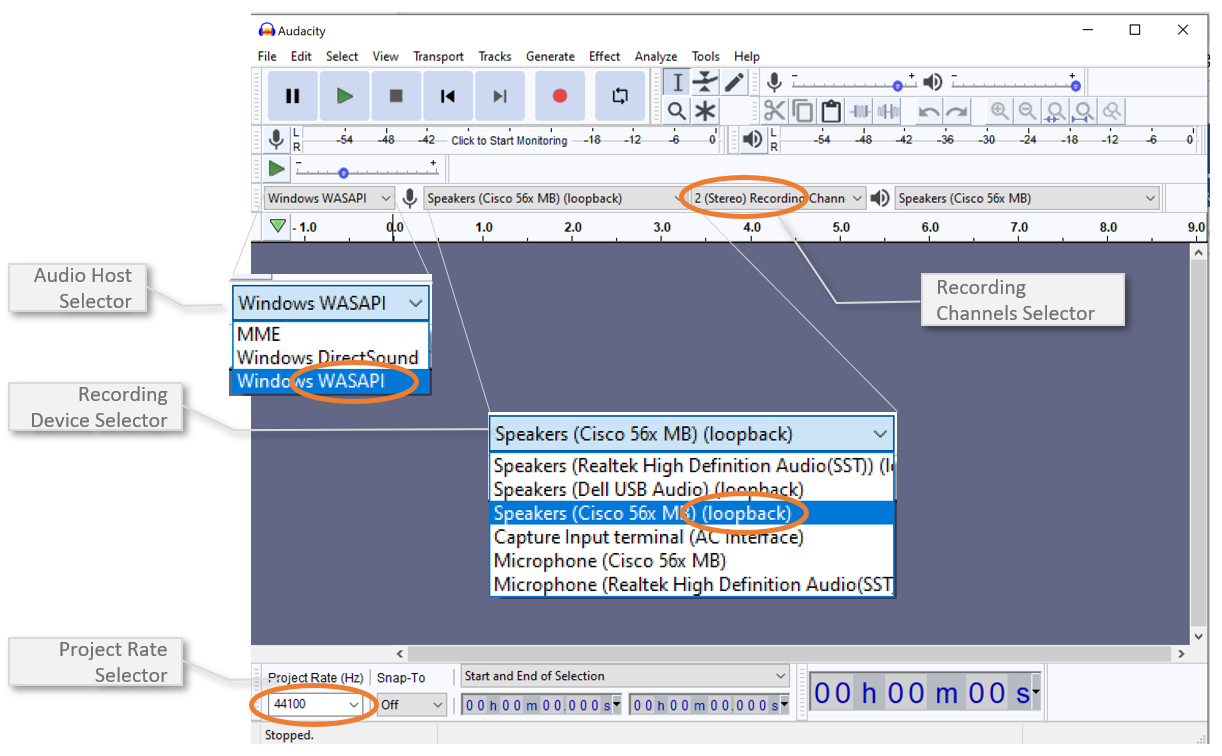
Audacity set up
- Open the Audacity program in Windows
- Choose Windows WASAPI from the Audio Host selector
- Choose a loopback device from the recording Device Selector (choose the device that you normally use for listening to audio on your PC)
- Choose 2 (Stereo) Recording Channels from the Recording Channels Selector
- Choose 44100 for the Project Rate (Hz) selector