![FMN_logo_2024.png]](https://support.forgetmenot.chat/hs-fs/hubfs/FMN_logo_2024.png?height=40&name=FMN_logo_2024.png)
▶️ Select Learners at Risk using the View Selector on the Insights Reports. Then choose between one of the different risk reports: Completion Risk, Competency Risk, Engagement Risk
Completion Risk Report
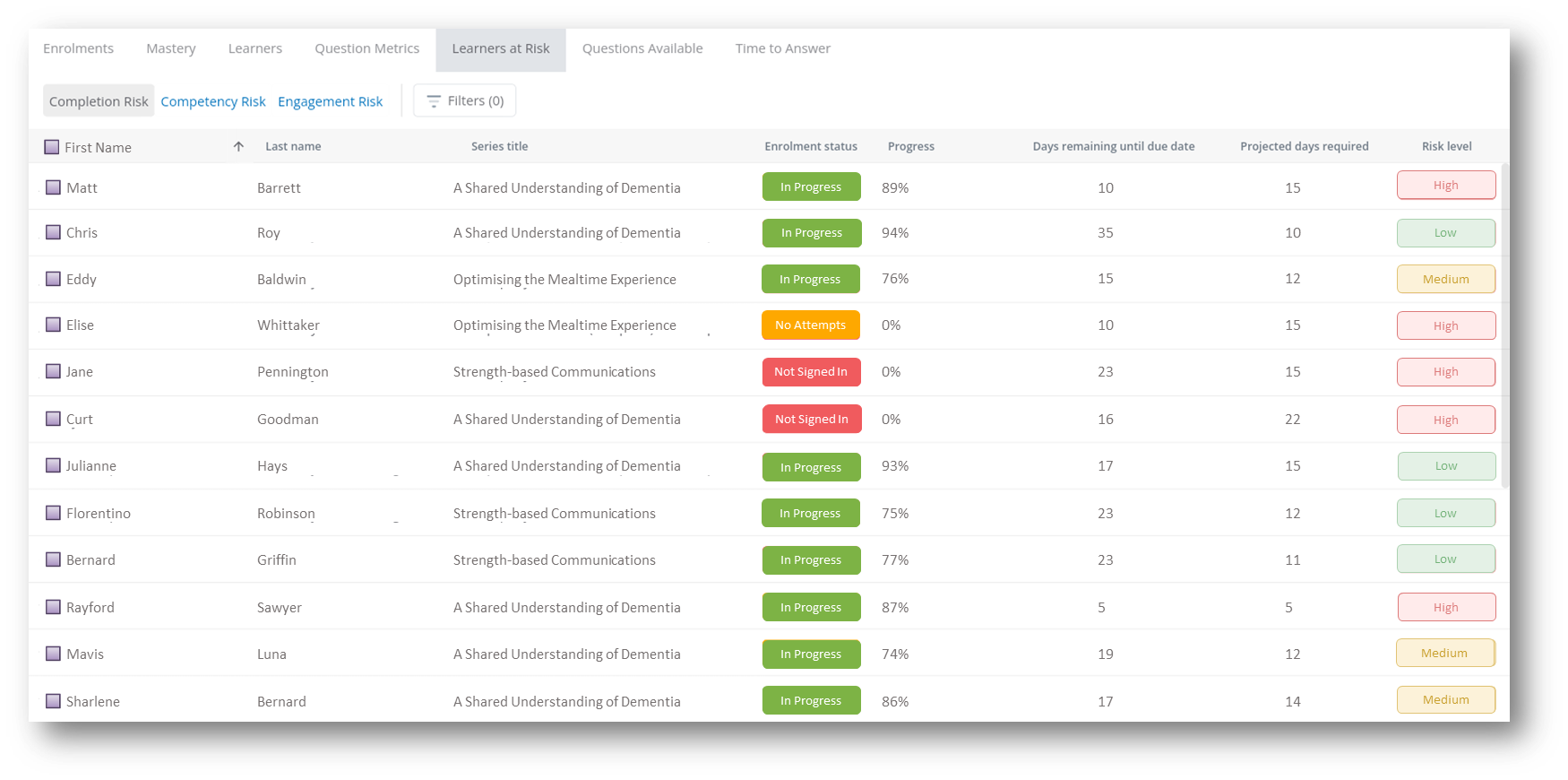
The completion risk report shows only learners that are at risk of not completing the enrolment before the due date is reached. Each learner, and the enrolled series, are shown in the list including the enrolment status and current progress in the series.
To help with understanding the risk, the number of days remaining until due are shown along with the number of days projected to master the series. These values, along with the progress percentage, are used to calculate the risk level.
⚠️Use the risk level to determine if the enrolment should be extended to allow extra time for the learner to master the series.
Details
Progress - this indicates the correct attempts over total attempts available in the series x100 and expressed as a percentage
Days Remaining until due date - this indicates the number of days left in the enrolment based on the Due Date
Projected Days - this indicates the number of days required to master the series based on the remaining progress percentage required to master the series, multiplied by the average time to master of previous enrolments (max 59 days is used if insufficient previous enrolment data is available)
Risk Level - this indicates a high, medium or low level of risk of disengagement which is based on the ratio of the number of days remaining divided by the projected days to complete.
- High - Learner is very unlikely to complete by their due date without intervention with a risk ratio of less than 1.2
- Medium - Learner may struggle to complete on time but still achievable with risk ratio of 1.2 to 1.5
- Low - Learner has sufficient time to complete based on their progress with risk ratio of 1.5 to 2.0
- No Risk - Learners with a risk ratio of 2.0 or greater are filtered out because they have no risk of disengagement
Exclusions:
- Only active enrolments are considered, those with status: In progress, No Attempts or Not started
- Excludes already mastered or withdrawn enrolments
- If a learner has been inactive in the enrolment for more than 14 days they will automatically increase the risk level up to the next value e.g. low > medium, medium > high
Filters - filters can be applied to ensure only specific criteria is displayed based on the following options: Tracking Code, Learner, Group, Series, Enrolled Date, Mastered Date, Active Users Only, Overdue Users only, Learners with available questions only.
⚠️ Any learner who has not signed in will automatically be marked as high risk
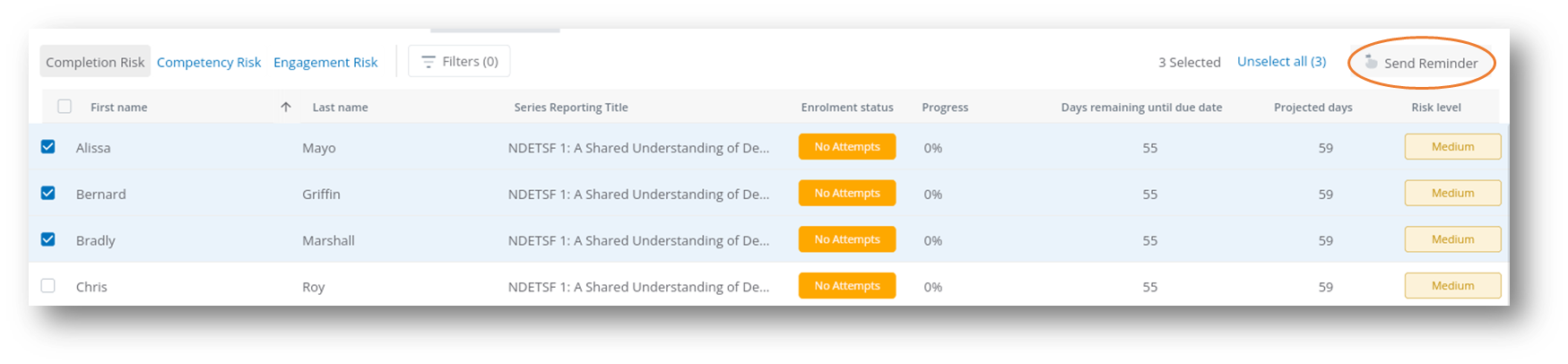
Send Reminder - select one or more learners in the list to be able to send them a reminder by email
Competency Risk
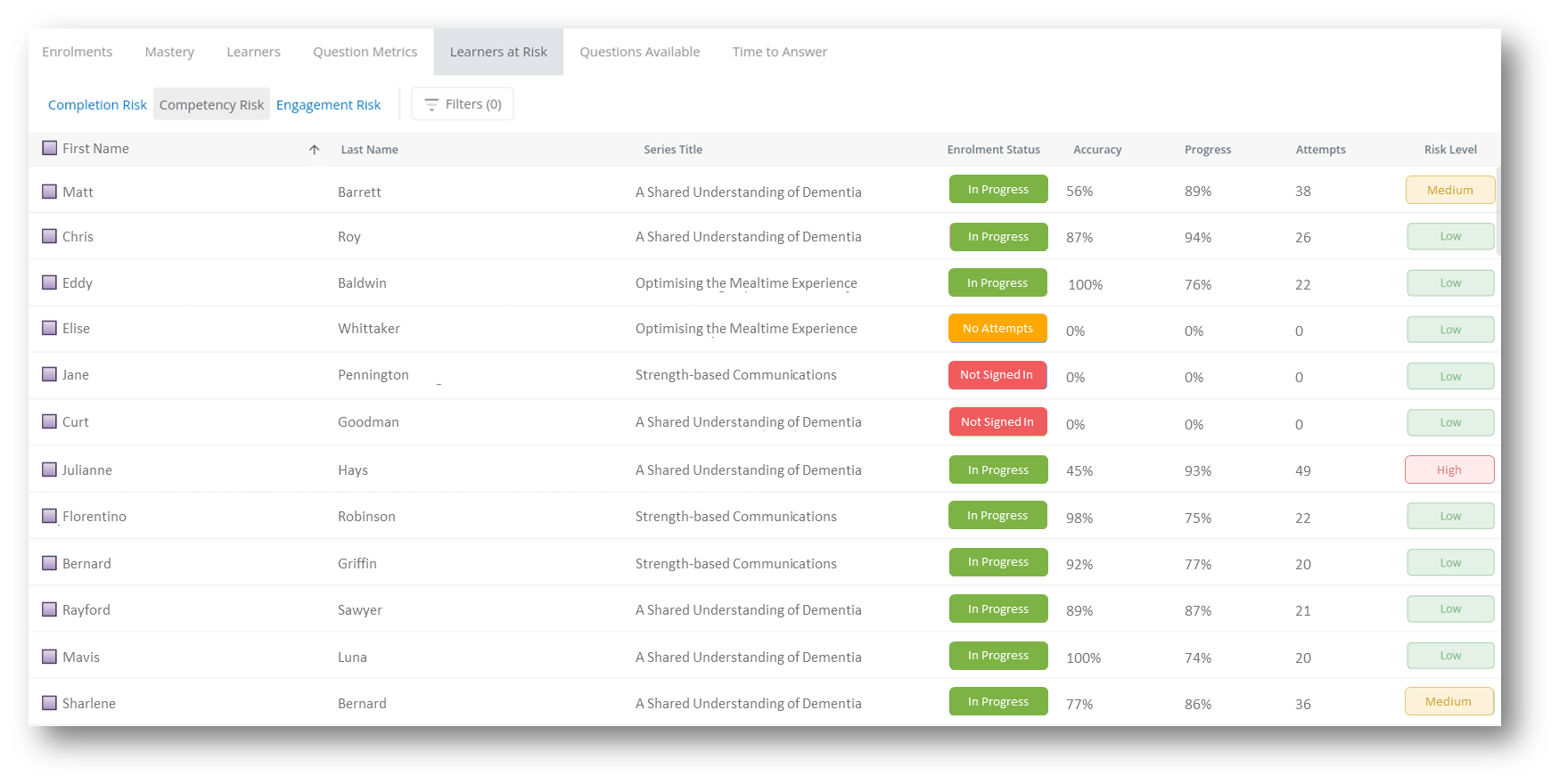
The competency risk report shows all learners and their competency risk level. Each learner, and the enrolled series are shown, along with the enrolment Accuracy and Progress % and the current number of attempts in the series. The attempts value is compared to the total attempts needed to master the series and is used to update the risk level indicator which shows if a learner is likely to struggle with mastering content based on their answer outcomes.
Details
Accuracy - this indicates the number of correct attempts over total attempts seen x100 and expressed as a percentage
Progress - this indicates the correct attempts over total attempts available in the series x100 and expressed as a percentage
Attempts - this indicates the number of correct attempts that have been submitted
Risk Level - this indicates a high, medium or low level of risk which is based on the number of attempts taken through the series when compared to the minimum number of attempts required to master.
- High - Learner is struggling significantly and may need additional support with a risk level ratio greater than or equal to 2x minimum attempts to master
- Medium - Learner is taking more attempts than expected but still manageable with a risk level ratio between 1.5x and 2x minimum attempts to master
- Low - Learner is efficiently mastering content or has just started their learning journey with a risk level ratio of less than 1.5x minimum attempts to master
Exclusions:
- If a learner has attempted fewer than 4 questions, they are automatically classified as Low Risk as this typically indicates the learner has only just started the enrolment
Filters - filters can be applied to ensure only specific criteria is displayed based on the following options: Tracking Code, Learner, Group, Series, Enrolled Date, Mastered Date, Active Users Only, Overdue Users only, Learners with available questions only
Send Reminder - select one or more learners in the list to be able to send them a reminder by email
Engagement Risk
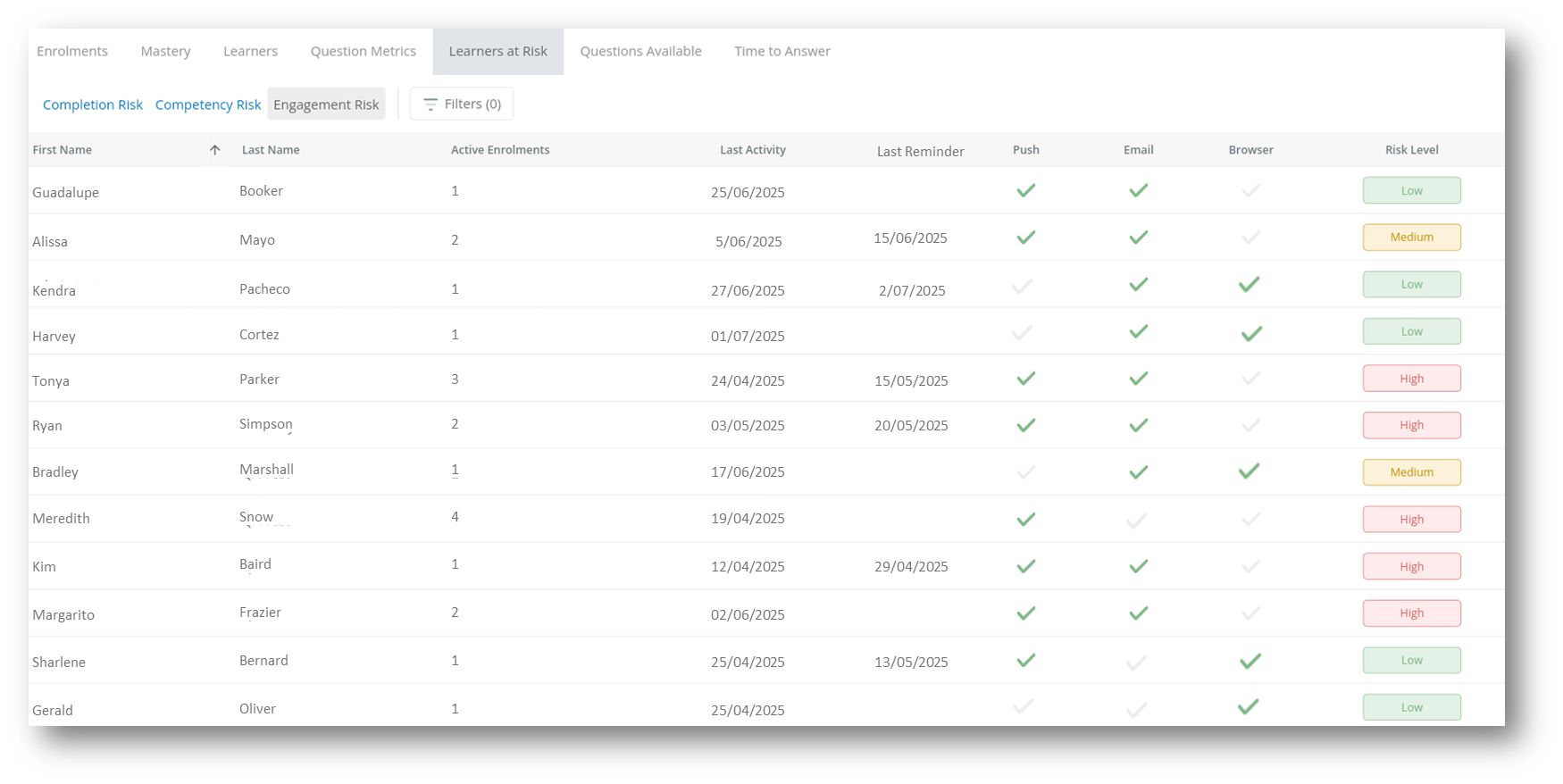
The engagement risk report shows all learners and engagement risk level. Each learner is shown with the number of active enrolments and the date of last activity in a series. The user configurable communication settings are also shown for push notifications, email and browser. The engagement risk level is based on the total number of points accrued by the learner.
Details
Active Enrolments - this indicates the number active enrolments the learner is enrolled in
Last Activity - this indicates the last time the learner was actively answering questions in any of their active series
Last Reminder - this indicates the last time the learner was sent a reminder by an admin to complete questions
Risk Level - this indicates a high, medium or low level of risk which is based on the total of number of points calculated from the last activity date and how many of the communication options that have been disabled.
- High - User shows multiple strong indicators of potential disengagement and has a score of 5 points or more
- Medium - User shows some warning signs of disengagement and has a score of 2-4 points
- Low - User is actively engaged or has no active enrolments and has a score of less than 2 points
For example
- If a user has no active enrolments, they are automatically classified as Low Risk
- If a user has activity within the last 14 days they get 0 points
- If a user's activity is between 15-30 days ago they get 1 point
- If a user's activity is between 31-60 days ago they get 2 points
- If a user's activity is more than 60 days ago they get 3 points
- If the user has no activity recorded they get 4 points
- The user gets 1pt for added each communication option disabled (maximum 2 pts)
Filters - filters can be applied to ensure only specific criteria is displayed, based on the following options: Learner, Group, Active Users Only
✅ Any learner with 0 enrolments will automatically be given a low engagement risk level
✅ Select a column heading to sort in ascending order, select again to sort in descending order
⚠️ Reports show all enrolments except for any where Series Preview mode was selected during the enrolment