![FMN_logo_2024.png]](https://support.forgetmenot.chat/hs-fs/hubfs/FMN_logo_2024.png?height=40&name=FMN_logo_2024.png)

Use advanced enrolments to view a list of enrolments and then select a pre-filtered view or search and filter to adjust further.
▶️ Go to the Series Library and select Single Enrolments to view a list of enrolments. Use the advanced filter to show specific enrolments based on the selected criteria.
Select Enrol Users to Series to create new enrolments in a Series for one or more existing users.
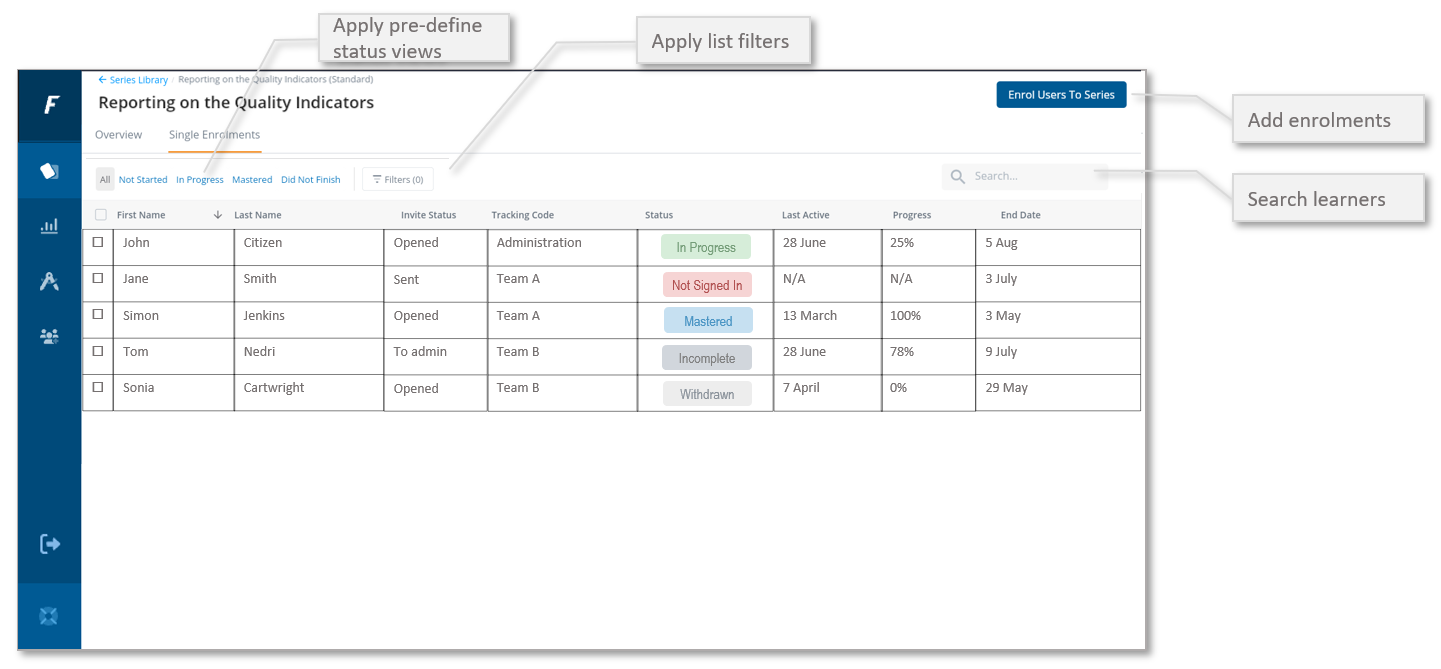
Pre-defined Status Views
- All - shows all enrolments for the Series
- Not Started - shows only enrolments with a status of Not Started which includes Not Signed in, No Attempts and Waiting to Start. This view will display the learners email, detailed invite status and the date of the enrolment which are useful when checking why the learner has not started the Series
- In Progress - shows only enrolments with an engagement status of In Progress. This view will display the learners last active date, progress and the date they started the enrolment which are useful when monitoring learner progress in the Series
- Mastered - shows only enrolments with an engagement status of Mastered. This view will display the learners mastered date, accuracy percentage and the date the enrolment ends and loses access to the Series, this is useful when reviewing learner mastery in the Series
✅ Only certain enrolment details are shown in the list depending on which pre-defined status view is selected. Select an enrolment record to view the full enrolment details.
✅ Columns can be sorted by A-Z ⬆️ or Z-A ⬇️ by selecting the column heading. This will change the sort order each time it is selected. Dates are sorted with included times although not shown.
⚠️ If you don't see the email column, screen width needs to be made wider. Expand the browser width to see all available columns.