![FMN_logo_2024.png]](https://support.forgetmenot.chat/hs-fs/hubfs/FMN_logo_2024.png?height=40&name=FMN_logo_2024.png)
The advanced enrolment filter can be applied in each of the different pre-defined views however only the relevant filter options will be displayed which reflect the contents included in the view.
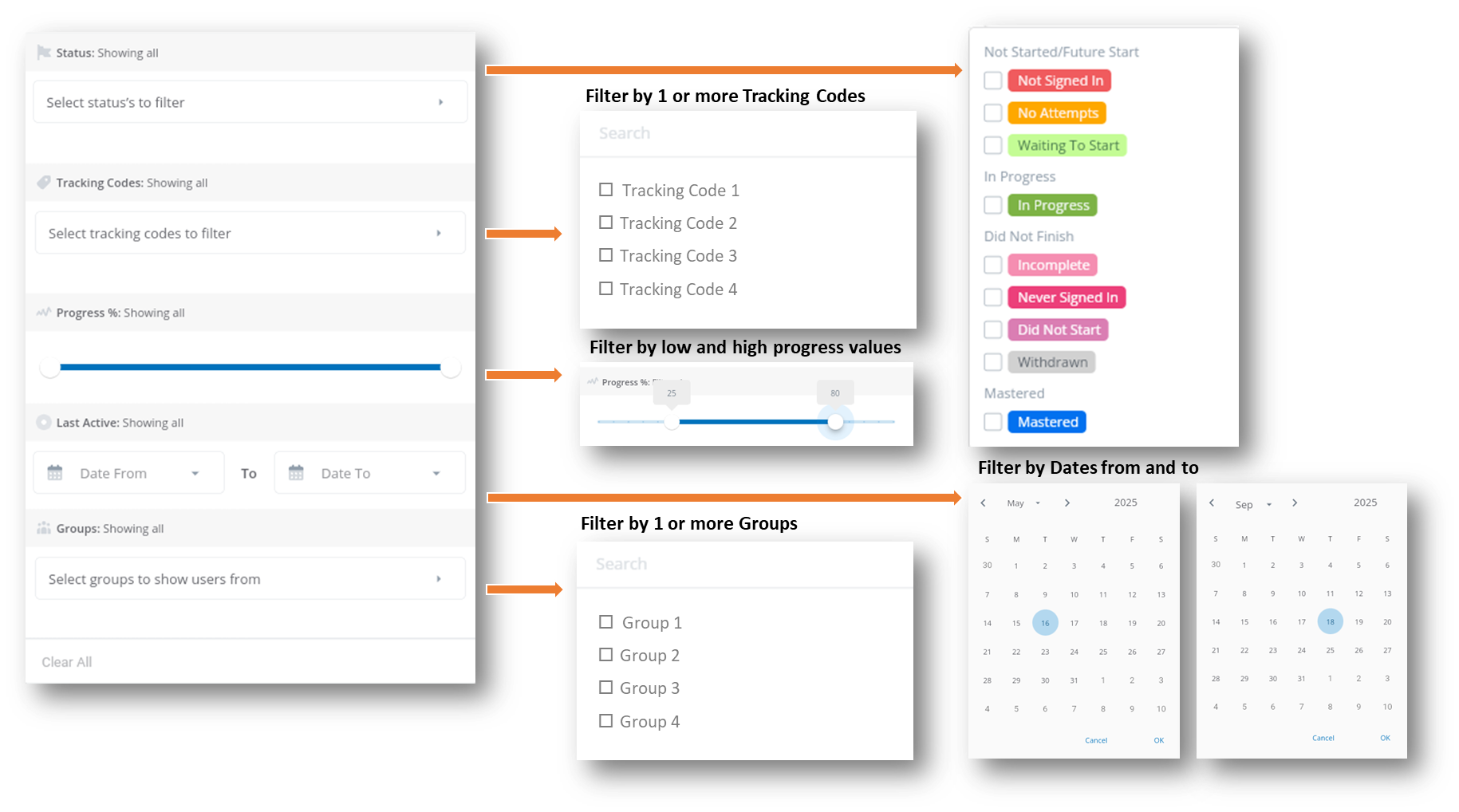
Filter options
- Status - select one or more status types to filter by. Status types are groups by high level categories
- Not Started / Future Start
- In Progress
- Did Not Finish
- Mastered
- Tracking Codes - select one or more tracking codes to filter by. Only records with tracking codes that match the selections will be shown. Tracking codes listed are those previously created across all enrolments in this or other Series
- Progress % - select a low and high percentage progress value to filter by, only records that fall within the progress values will be shown, including the selected values
- Last Active Date - select from and to last active dates to filter on, only records that fall within the dates will be shown, including the selected dates
- Groups - select one or more groups to filter by. Create Groups and then add users into groups to use this filter. Only records that match the group membership will be shown
✅ Untick each selection or use Clear All to reset the filter to show all enrolments