![FMN_logo_2024.png]](https://support.forgetmenot.chat/hs-fs/hubfs/FMN_logo_2024.png?height=40&name=FMN_logo_2024.png)
Question Sets listed in the Question Studio can be copied into a new Question Set. This can be useful if existing content can be reused in a similar question set.
There are multiple ways to create a copy of a question set:
- Select Create a Copy from the Question Studio options menu
- Select Create a Copy from the Question Builder View Mode
- Select Create a Copy from the Question Builder Edit Mode
Steps to create a copy
- Select Create a Copy from one of the possible menu options.
- Enter a unique name for the question set to replace the provided default name.
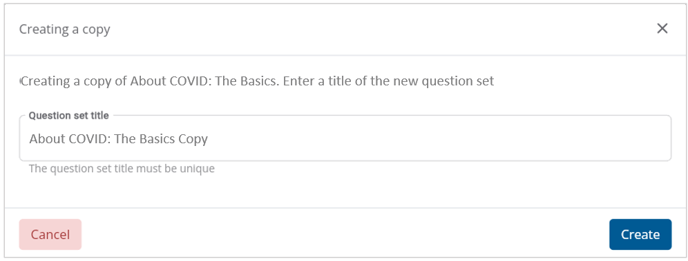
- Then select Create to continue.
- The option to remain in the current question set or switch the the new copy is offered.
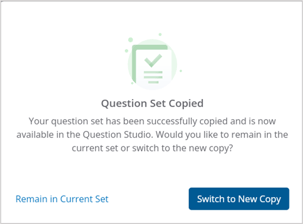
- Select one of the options:
- Remain in Current Set to keep working with the question question set
- or Switch to New Copy to close the current set and open the new copy set
⚠️The copied Question Set will be the same question set type and the same authoring state as the source question set