![FMN_logo_2024.png]](https://support.forgetmenot.chat/hs-fs/hubfs/FMN_logo_2024.png?height=40&name=FMN_logo_2024.png)
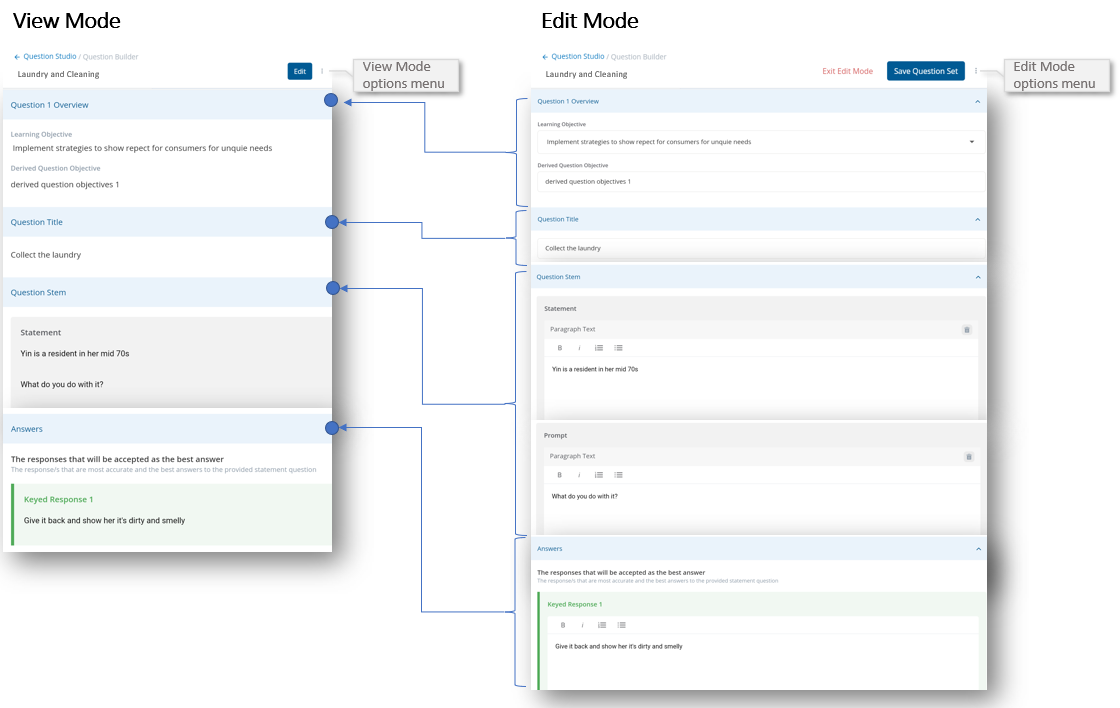
The Question Builder uses view mode by default when an existing question set is opened when selected from the Question Studio. This allows the whole set of questions to be viewed without any editing or formatting functions shown and still allows for the preview of resources, images and videos.
✅ View mode is indicated when you can see the Edit button
✅ Edit Mode is indicated when you can see the Exit Edit Mode and Save Question set button
Use Edit mode to add, edit and delete content blocks. Use View mode to preview just the content.
This image shows the visual differences between each mode.
View Mode options menu - Select Create a Copy to create a copy of the question set
Edit Mode options menu - Select Create a Copy to create a copy of the question set