![FMN_logo_2024.png]](https://support.forgetmenot.chat/hs-fs/hubfs/FMN_logo_2024.png?height=40&name=FMN_logo_2024.png)
▶️ Select Series > Series Library from the left-hand menu to view.
The Grid View is the default view. Change to the List View or use Sort By or Search to find a specific series. Select Create Series if a new series is required
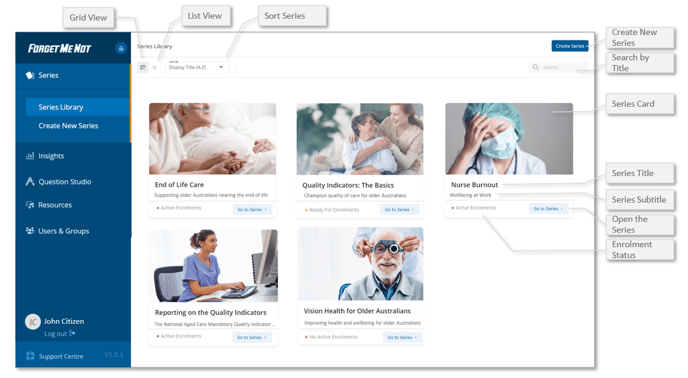
▶️ Each Series card shows the Series Enrolment Status, select a Series Card or use the Go to Series option to see Series Overview and manage enrolments.
✅ Use Sort by to arrange Series by Display Title (A-Z), Reporting Name (A-Z) or Most Recent
Take a tour of the Series Library with this interactive video