![FMN_logo_2024.png]](https://support.forgetmenot.chat/hs-fs/hubfs/FMN_logo_2024.png?height=40&name=FMN_logo_2024.png)
You have just exported Insights reports to PDF and noticed that the status selections that you made have not been exported into the downloaded PDF. Maybe you thought you had missed them and so went to do the download again with the same results.
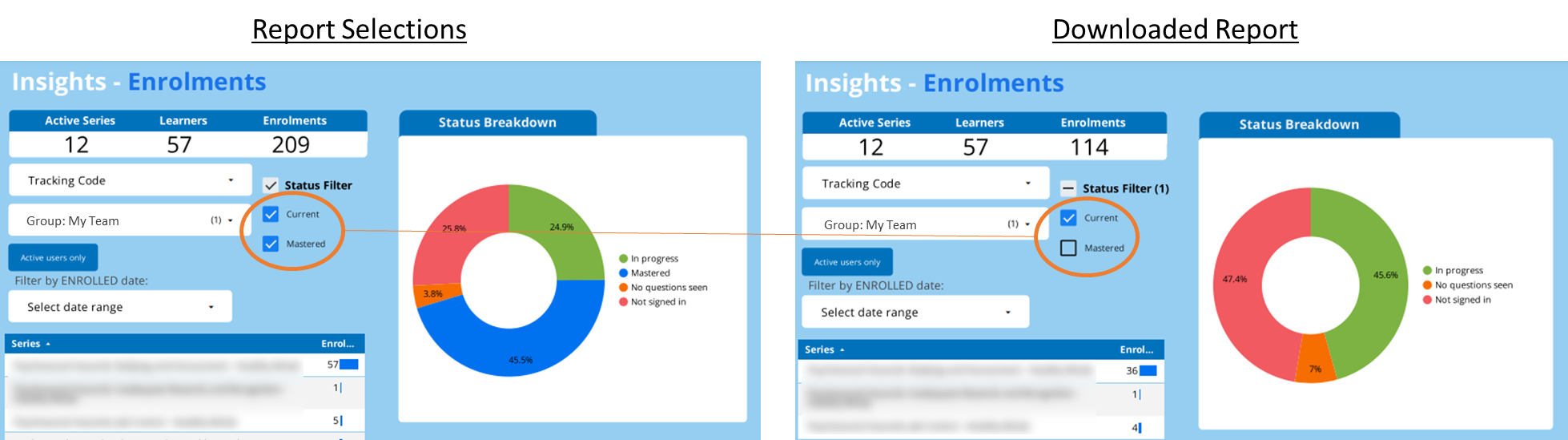
Don't worry it's not you 🙂. With Insights reports, when there are multiple filters for status, groups and tracking code there can be certain times when the data is not included due to cross filtering.
How to fix cross filtering
When exporting reports, such as Enrolments data, which has status and other filters, the following selection order must be followed.
- Reset or Reload the Insights to make sure no filters are currently applied.
- Make the selections for Status Filter first. e.g current & mastered.
- Then apply other filters such as Group or Tracking Code.
- Then use the Download to PDF function to export the data.