![FMN_logo_2024.png]](https://support.forgetmenot.chat/hs-fs/hubfs/FMN_logo_2024.png?height=40&name=FMN_logo_2024.png)
When creating questions in the Question Builder it's normal for content to be copied and pasted directly from a word document or similar external application that already has bullets applied to parts of the text.
When this happens the text content can look ok in the content block and display like the bullets are properly formatted, however when viewed in the Question Previewer the bullets don't display correctly.
Bullets with Incorrect Formatting
These bullets have been pasted from a word document that had existing bullet formatting.
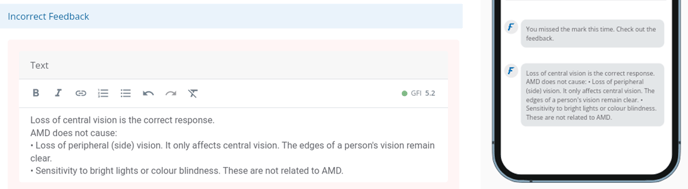
Note: The bullets pasted from word may not have any indenting when shown in the content block
Bullets with Correct Formatting
These bullets have been formatted using the in-built editor.
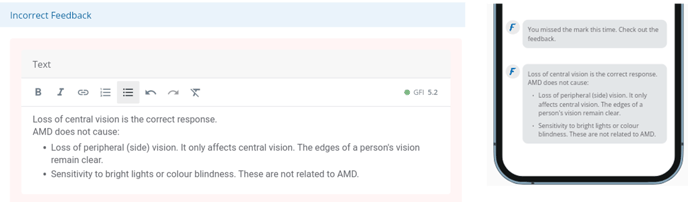
Note: Correct bullets have indenting when shown in the content block
✅ To fix the bullet formatting, select the bullet text and use the clear format button  Then use the bullets button
  to apply the correct formatting