![FMN_logo_2024.png]](https://support.forgetmenot.chat/hs-fs/hubfs/FMN_logo_2024.png?height=40&name=FMN_logo_2024.png)
Pathway past enrolment list will show a list of all learners previously enrolled in the pathway that have either mastered the pathway or have not completed it. Details are provided such as the date the pathway ended e.g. completed date (if mastered), withdrawn date (if withdrawn) or ended date (if expired), the pathway progress percentage and overall accuracy in the pathway.
A learner's progression in the pathway can also be shown when an enrolment is selected.
▶️ Go to the Pathway Overview and select Past Enrolments
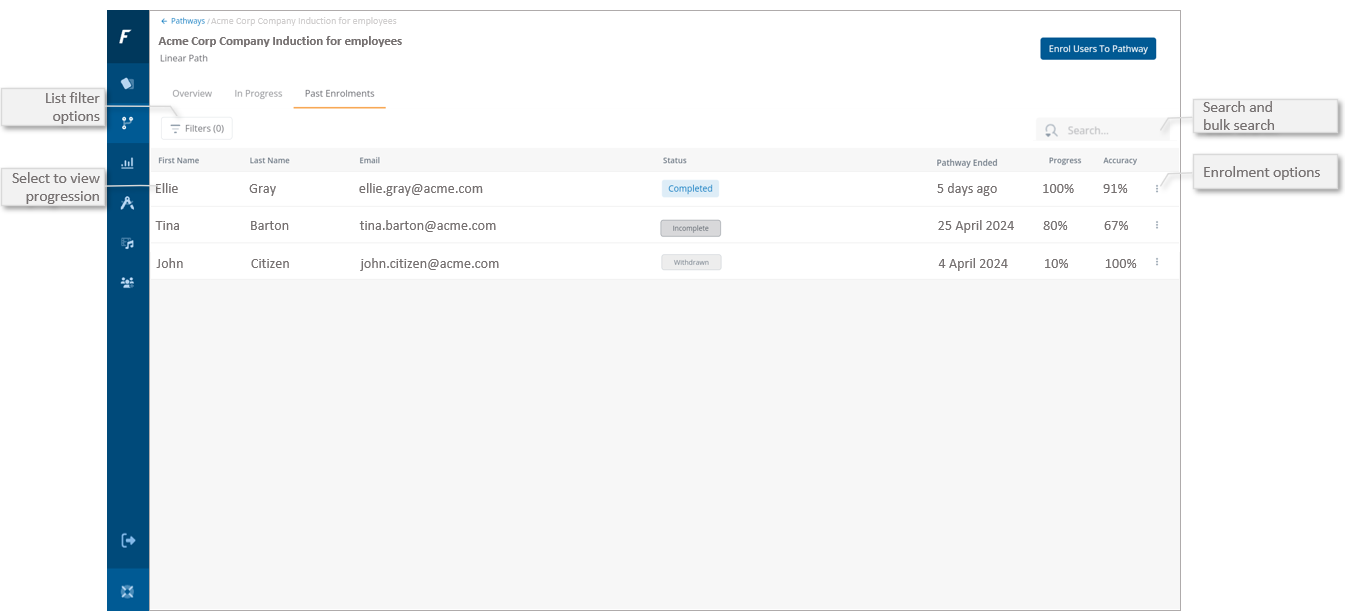
Filter Options - Filter the list by Enrolled Date, Status, Groups, Tracking Codes and Progress & Accuracy %
View Learner Progression - Select a learner from the list or choose View Progression from the Enrolment options menu to see how the learner is progressing through the pathway.
Bulk Search - search for a specific user by name or email or use the bulk search function to filter the list by a matching against a list of email addresses.
Enrol users into the pathway - Provides the ability to enrol users into the pathway.
Pathway Ended - The date that the pathway ended which is determined by the status as follows:
- Completed - will show the date that the pathway was completed when the last series was mastered
- Withdrawn - will show the date when the learner was withdrawn from the pathway
- Incomplete - will show the date when the last active series expired
Progress - The percentage that the user has progressed through the pathway, based on the total number of attempts required to master all questions in all series in the pathway.
Refer to tracking pathway progress percentage for more details.
Accuracy - The percentage calculated from all correct attempts over total attempts seen x100 for all questions in the pathway