![FMN_logo_2024.png]](https://support.forgetmenot.chat/hs-fs/hubfs/FMN_logo_2024.png?height=40&name=FMN_logo_2024.png)
Created User Enrolment Email
When a user is created in your organisation and the option to send the invite with password was not selected, they will not receive a welcome email. This means they won't have the necessary information to sign in just yet. To provide all the necessary details the system will automatically send the welcome details with their first enrolment and this is the default recommended path.
✅ Created users are those people that have been invited to your organisation and not sent a welcome email and therefore have not yet signed in.
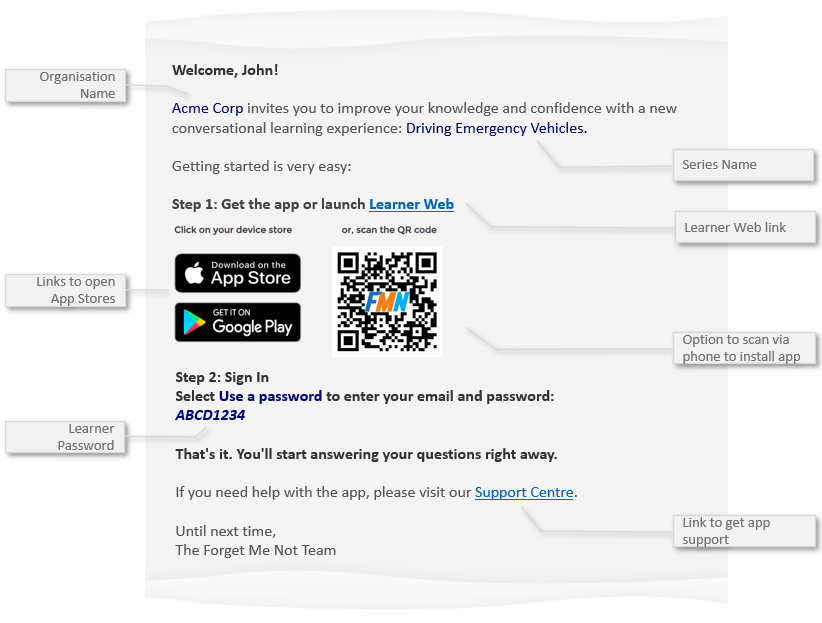
The initial enrolment email contains a link to access Learner Web along with App Store links, QR Code and a generated password.
Subject: John - Time to start mastering Driving Emergency Vehicles from Acme Corp
⚠️ Users will only receive this invite if Send Invite & Password to User was not selected during the create single user process or if Send Welcome was not selected during the create multiple user process
✅ If users can only access email on their computer, then scanning the QR Code with their phone will take them to the app store directly no matter which type of mobile device they have