![FMN_logo_2024.png]](https://support.forgetmenot.chat/hs-fs/hubfs/FMN_logo_2024.png?height=40&name=FMN_logo_2024.png)
✅ If you only have a few users, consider adding them individually
Inviting multiple users into the org is a simple 2 step process
- Download and fill in the import file template
- Configure user type and invite comms method
Download and fill in the import file template
- Go to Users & Groups and select Users.
- Select File Import.
- Select Download Template and save the CSV file on your computer.
- Fill in the CSV template with the names and email addresses of all users (see note).
- Select the completed CSV template file to upload and then select Continue.
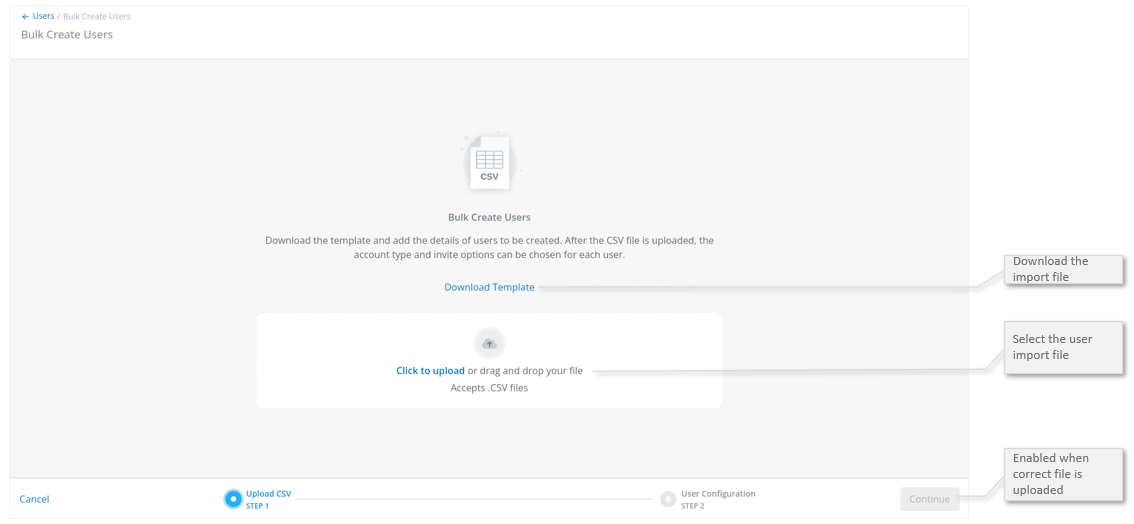
⚠️ If your data has been exported from another system, consider cleaning your data first before importing to help reduce import issues
Configure user type and invite comms method
- For each listed user:
- Choose the Account Type as required. The default is type User.
- Leave the Send Invite & Password to User/Guest option cleared and only tick if the user should receive the new user organisation invite email with password (for Admin users only). When cleared, the password will be included with the users first enrolment in the created user series enrolment email.
- Select Create Users to continue.
- All users will be shown the Users List.
- The current console Admin will receive the Created User Completion email.
✅ Select all users and then use the bulk actions to apply changes to all users in the list
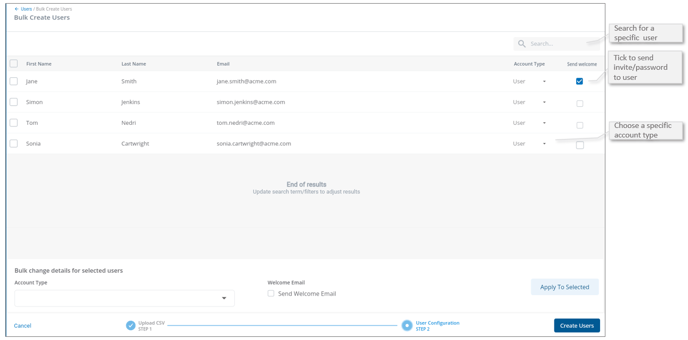
⚠️ The Send Welcome option is cleared by default. This means all account details, including the users password, will be sent to the logged in admin user and not sent to the user. The system will send all account details to the user with their first enrolment which is the preferred method.
✅ If there are duplicate records in the CSV file where all fields match then the duplicate record will be ignored during import. This may be indicated by a lower user count after the import processes is executed compared to the user count in to the CSV file.