![FMN_logo_2024.png]](https://support.forgetmenot.chat/hs-fs/hubfs/FMN_logo_2024.png?height=40&name=FMN_logo_2024.png)
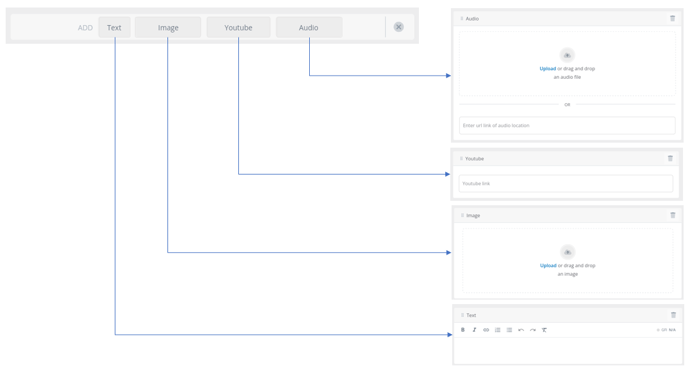
Media content blocks are used to add different media types into the question content:
- Text
- Image
- YouTube link
- Audio file
Content blocks can be applied to the following question parts:
- Question Statement and Prompt
- Correct Feedback
- Incorrect Feedback
Adding a Content Block
When in Edit mode, the Add Content Block option will appear in the relevant parts of a question.

- Select Add Content Block.
- The media type options will appear.
- Select one of the media types that you want to insert.
- The content block will be placed at the insertion point.
- Use the menus to upload a file, drag and drop or paste in a URL link as applicable.
✅ You can use  to drag and drop Content Blocks to change the order if needed
⚠️If a content block remains empty the Question Builder will not allow you to publish the question set.