![FMN_logo_2024.png]](https://support.forgetmenot.chat/hs-fs/hubfs/FMN_logo_2024.png?height=40&name=FMN_logo_2024.png)
When an enrolment is created the End Date is calculated and set based on the duration parameter of the Series and the Enrolled Date.
Duration for a Series can be either:
- Mastery (12 months from the enrolled date)
- Fixed (a time period specified in days, weeks, months or years from the enrolled date)
Sometimes it may be required to extend the end date for an active enrolment or in the case of an expired or withdrawn enrolment, reinstate it and provide a new end date.
⚠️Learners are not automatically notified when an enrolment is extended or reinstated so it's recommended to send a manual reminder to let them know they can start answering questions again.
Extend an Active Enrolment
Active enrollments are those with a status of In Progress, with these enrolments, the End Date can be extended to bring the date forward if required to end the enrolment early or to extend it out by a maximum of 12 months from the current date if the learner requires more time.
- Go to the Series Library.
- Select a Series and view the Series Enrolments List.
- Use search or filters to find a specific learner enrolment record.
- Select a single enrolment to view the Enrolment Details or select multiple enrolments to show the enrolment bulk actions menu.
- Select Extend Enrolment.
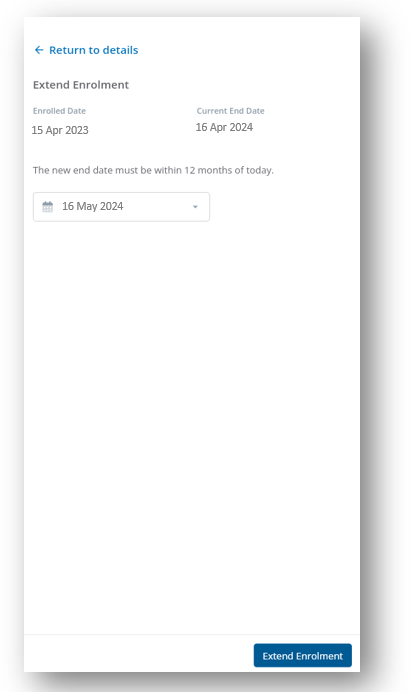
- Review the Enrolled Date and Current End Date and then select a new End Date.
- Select Extend Enrolment to save the changes.
- The learner enrolment record is updated with the new End Date.
⚠️ The enrolment will always expire at 12:01 am on the date selected
✅ If an enrolment status is Not Signed In or No Attempts then it must be withdrawn first before it can be extended out
Reinstate an Inactive Enrolment
Inactive enrollments are those with a status of Expired or Withdrawn, with these enrolments the End Date can be set to reinstate the enrolment to allow the learner to continue off where they were last. The date can be extend out by a maximum of 12 months from the current date.
- Go to the Series Library.
- Select a Series and view the Series Enrolments List.
- Use search or filters to find a specific learner enrolment record.
- Select a single enrolment to view the Enrolment Details or select multiple enrolments to show the enrolment bulk actions menu.
- Select Extend Enrolment.
- Review the Enrolled Date and Current End Date and then select a new End Date.
- Select Extend Enrolment to save the changes.
- Each learner enrolment record is updated with the new End Date and status In Progress.
⚠️ The enrolment will always expire at 12:01 am on the date selected
✅ Learners will continue the enrolment at the question and progress % they were prior to expiring or being withdrawn, so they don't need to start from the beginning of the questions