![FMN_logo_2024.png]](https://support.forgetmenot.chat/hs-fs/hubfs/FMN_logo_2024.png?height=40&name=FMN_logo_2024.png)
▶️ Select Learners using the View Selector Tab on the Insights Reports. Content can be further refined by filtering using Series, Tracking Code, Groups, Enrolled Date, Learner, or Status
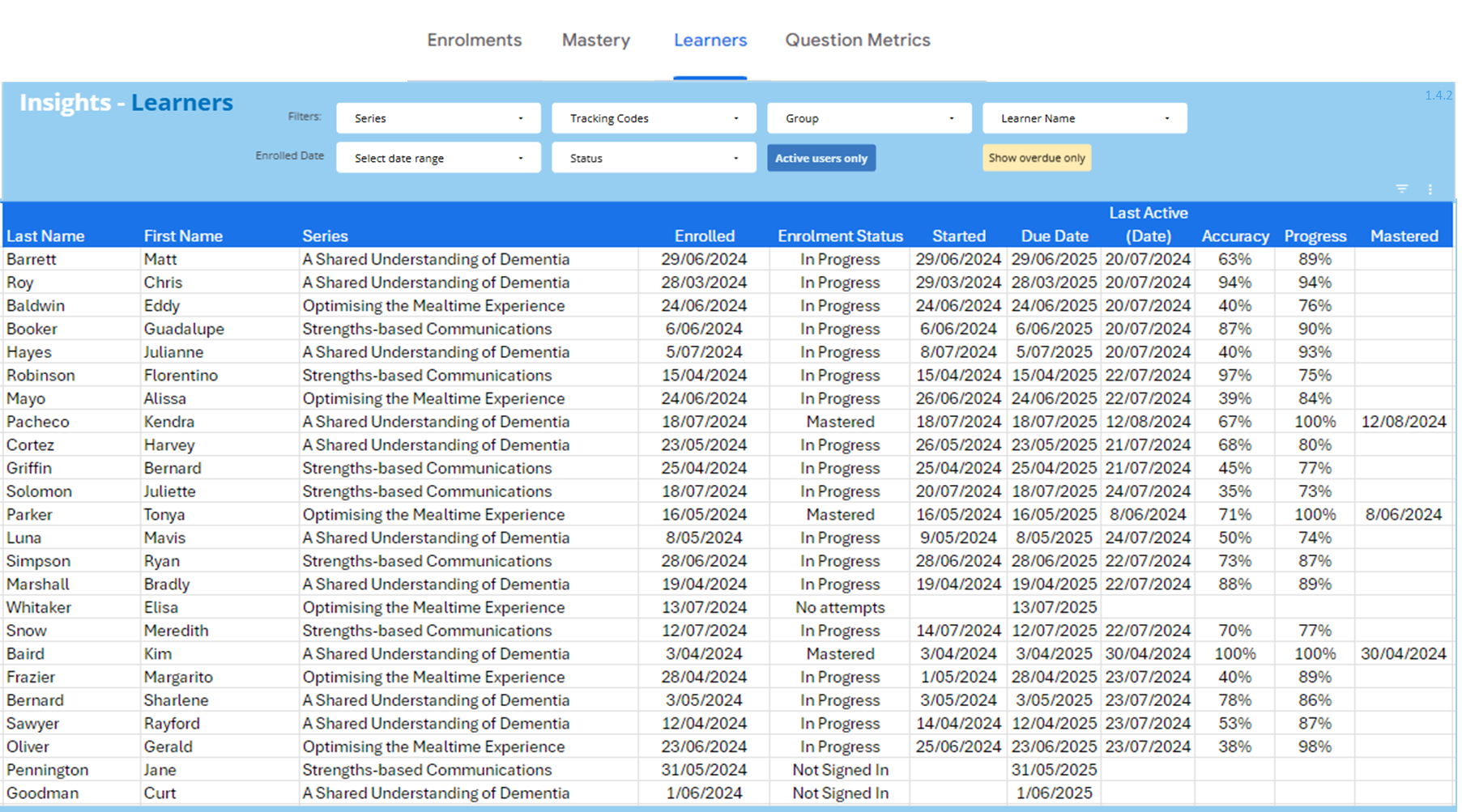
Filters and Selectors
- Series Name - select one or more series to filter the list of learners
- Tracking Code - select one or more tracking codes from the A-Z sorted list to filter the list of learners. The Tracking Codes list will be limited based on the applied Release Date filter
- Group Filter - The selected Group will filter the enrolments to show only those that match. Org Wide and Org Active Only can be used to show all users regardless of an assigned group
- Enrolled Date - select a date range to filter the list of learners. Any date range filter applied will also limit the items displayed in the Tracking Codes list
- Learner - select one or more Learners by name to filter the list of learners
- Status - select one or more Series Status to filter the list of learners
- Show overdue only - This button is disabled by default
 will show all enrolments regardless of Due Date and status
 will only show enrolments where the status is In progress, Not Signed In or Not Questions Seen and the Due Date is older than today's date
 -
Current Users Only - This button is enabled by default (dark blue).
 this mode will only show active users, any deactivated users will not be shown
 this mode will show all users included any deactivated users
Main Content
- Learner name (Last & First Name)
- Series (Reporting Title)
- Enrolment Status
- Key Dates
- Enrolled - the date when the learner was enrolled in the Series
- Started - the date when the learner opens the Series and answered their first question for the enrolment
- Due Date - is a recommended date set at the time of enrolment, to indicate when the series should be completed but is not the expiry/ end date of the series
- Last Active (Date) - the date of the latest attempt, or if no attempts have been made the date when the first question was answered
- Mastered - the date when the Series was completed by the learner
- Accuracy - percentage calculated from correct attempts over total attempts seen x100
- Progress - percentage calculated from correct attempts over total attempts available x100
✅ Select a column heading to apply to sort in ascending or descending order, use reset ⤺ to clear all filters, and sorting back to defaults
⚠️ Learner Reports show all learners which also includes Enrolments where Series Preview mode was selected
✅ select  to export data for further analysis