![FMN_logo_2024.png]](https://support.forgetmenot.chat/hs-fs/hubfs/FMN_logo_2024.png?height=40&name=FMN_logo_2024.png)
For any new user they need to be invited to the organisation by one of two options in order to have an account created. Depending on the setting used during this process, it will determine the user's invite status (Invited or Created) and whether a welcome email is sent or not.
The system will keep track of this and will determine if welcome information needs to be included with the first enrolment if the Send Invite enrolment option is selected.
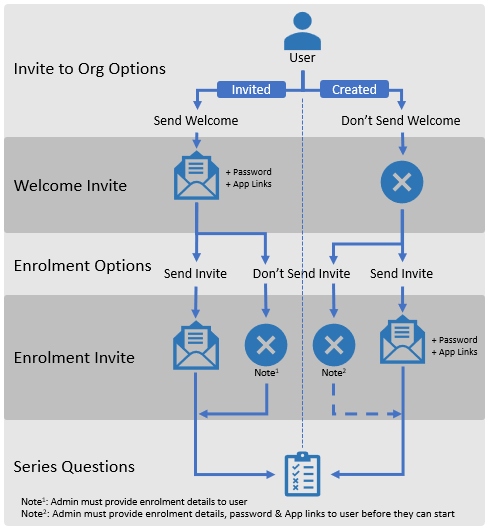
✅Any notification will also check if Learner Web (LW) has been enabled for the org and therefore will include relevant links as required.
The following table shows the possible invite options and the associated notifications for users based on the User Invite Status.
| User Organisation Invite option | ||||
|
Send Invite & Password |
Don't Send Invite & Password |
|||
| Invite Multiple Learner: | Send Welcome | Don't Send Welcome | ||
| Email Reason | Invite Status: Invited | Invite Status: Created | ||
| Org Welcome Invitation | Invited Organisation User Welcome Email (see note 3) | No email sent to user (see note 3) | ||
| 1st Series Enrolment | Current User Series Enrolment Email (see note 4) | Created User Series Enrolment Email (see note 4) | ||
| Series Enrolment within 48hrs of password generated and user not signed in | Series enrolment email when password unactivated (see note 4) | |||
| Email Reason | Current User (Signed In) | |||
| Series Enrolments |
Current User Series Enrolment Email (see note 4) |
|||
| Series Enrolment Reminder | Series Enrolment Reminder Email # | |||
| Series Next Question Waiting | Next Question Waiting Email # | |||
| Series Next Question Still Waiting (+2hrs) | Next Question Still Waiting Email # | |||
| Admin Nudges Learner to continue | Enrolment Nudge Email (see note 5) | |||
| Series Completion | Series Mastery Email # | |||
▶️ Note 3: When 2 or more users are invited at the same time by using the bulk create users method or when create another user is selected when inviting single users, the admin will be sent account details via the created users completion email
▶️Note 4: By default Send Invite is enabled, if cleared the user will not be sent the enrolment invite details
⚠️Note 5: Feature to be made available in the console in 2024
✅ Email Notifications marked with # are automatically sent by the system once the user has been enrolled in a series